
[아두이노] Otto Bot and Bluetooth
 양재동메이커
- Download
- OTTO_BT_easy.ino(6.9 KB) 2019-06-0823
- Link
- http://www.hellmaker.kr/uploads/editor/2019/PLUS-add-code-of-conduct-1.zip90
- http://www.hellmaker.kr/uploads/editor/2019/PLUS-master.zip67
이전 단순 Otto조립에서 추가로 Bluetooth를 연동하여 핸드폰 조정을 도전해 보았답니다.
집에 보유하고 있는 Bluetooth모듈이 HC-05와 HC-06이었으며 설정으로 Bluetooth의 이름/암호 변경으로 꽤 오랜 시간 동안 삽질을 하게 되었습니다.
추후 Bluetooh의 설정 및 문제되었던 부분에 대해서 정리하여 공유 하도록 하겠습니다.
사용 Source는 Git Hub에서 받으시면 됩니다. (상단 링크 참조)
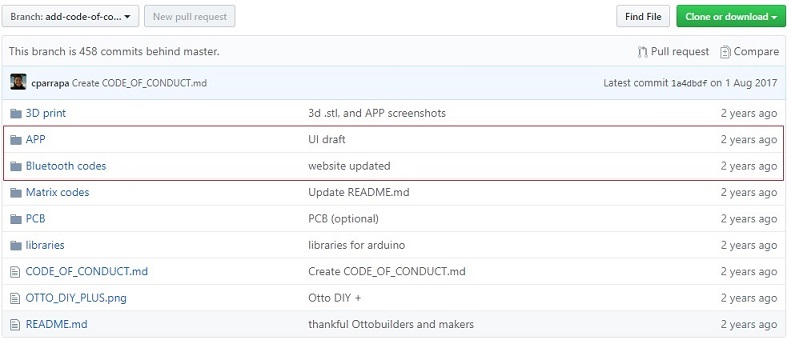
APP의 앤인벤터와 Bluetooth codes의 OTTO_BT_easy 아두이노를 사용할 하였습니다.
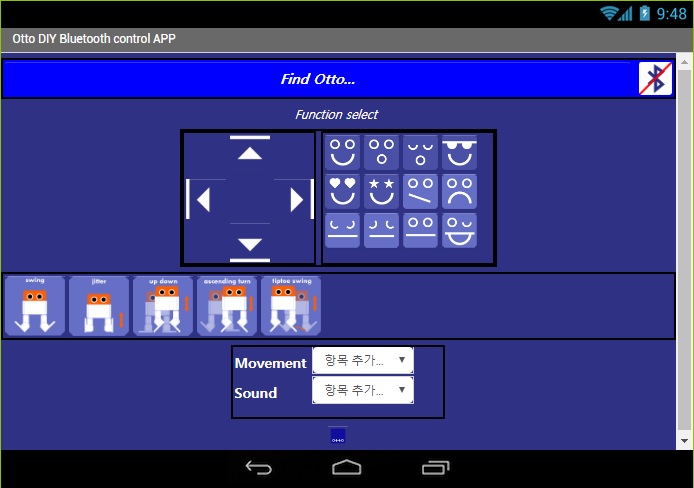
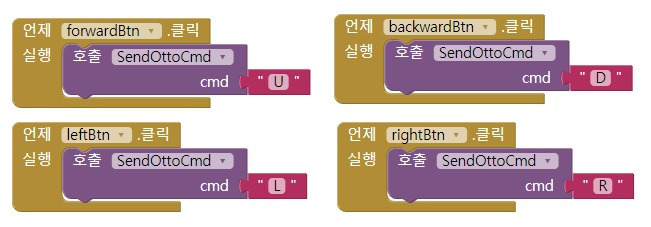
앱 인벤터 화면의 사용 핸드폰이 화면 크기에 맞추는 정도의 작업 필요하며, 블록에서 Bluetooth에 보내는 캐릭터 문자를 U D L R을 사용하는 아두이노 소스에 맞도록 수정 작업 진행 하였다
제공된 아두이노 소스가 프로그램 Upload의 번거로움이 있어 10,11Pin을 활용한 Software Serial로 일부 코드를 수정 하였다.
#define PIN_BLUETOOTH_RX 10 #define PIN_BLUETOOTH_TX 11 ///////////////////////////////////////////////////////////////////// // Setup /////////////////////////////////////////////////////////////////// void setup(){
Serial.begin( 9600 ); //setup your bluetooth module to match this baudrate (or change it here) (https://github.com/OttoDIY/OttoDIY) BTSerial.begin( 9600 ); // // Set the servo pins // Otto.init(PIN_YL,PIN_YR,PIN_RL,PIN_RR,true); Otto.sing(S_connection); //Otto wake up! Otto.home(); delay(50);
Otto.sing(S_happy); // a happy Otto :) } /////////////////////////////////////////////////////////////////// //-- Principal Loop ---------------------------------------------// /////////////////////////////////////////////////////////////////// void loop() { //---------------------------------------------------------------- // If something received over bluetooth, store the char //---------------------------------------------------------------- if( Serial.available() ) dato= Serial.read(); if( BTSerial.available() ) dato= BTSerial.read();
//---------------------------------------------------------------- // check the char received //---------------------------------------------------------------- switch(dato) {//if we receive a... case 85: //"U": Up arrow received { Otto.walk(2,1000,1); //2 steps FORWARD } break;
case 68: //"D": Down arrow received { Otto.walk(2,1000,-1); //2 steps FORWARD } break; case 67: //"C": Center button received { Otto.playGesture(OttoFretful); Otto.home(); Otto.sing(S_sleeping); delay(1000); } break;
case 76: //"L": Left arrow received { Otto.turn(2,1000,1);//2 steps turning RIGHT delay(50); } break;
case 82: //"R": Right arrow received { Otto.turn(2,1000,-1);//2 steps turning RIGHT delay(50); } break;
case 97: // "a" Received { Otto.moonwalker(3, 1000, 25, 1); Otto.home(); } break;
case 98: // "b" Received { Otto.bend (1, 2000, 1); Otto.home(); } break;
case 99: // "c" Received { Otto.ascendingTurn(1, 2000, 22); Otto.home(); } break;
case 100: // "d" Received { Otto.updown(1, 2000, 22); Otto.home(); } break;
case 101: // "e" Received----OBSTACLE MODE ON!!!! (until a button is pressed in the app)------ { obstacleMode(); } break; //////////You can add different modes here with the other buttons in the app (f,g,h...) } dato=0; //clears the incoming data until it receives the next button from app }
|
핸드폰에 인벤터 설치 후 Otto Bot의 전진 / 후직 / 왼쪽은 정상 동작하나 오른쪽 이상 동작하여 현재 관련 원인을 분석중에 있나, 혹 해결 되신분 정보 공유 부탁 드립니다.
Otto libraries 파일중 trun함수 부분 중 일부 조정이 필요하지 않을까 판단 됩니다.





메이커 스토리
최근 게시물
 HellMaker

 청계천도사
청계천도사Tag Clouds